
My Hilarious Journey with League's WASD Controls: A New Era or Just a Gimmick?
Discover the revolutionary WASD controls in League of Legends, enhancing accessibility and gameplay with innovative, customizable keyboard options for 2025.
Oh boy, as a seasoned League of Legends addict who's been clicking away since the dark ages of 2010, I nearly spilled my coffee when Riot Games announced WASD controls! Imagine that—after years of mouse-only movement, we now have an option that feels like borrowing a page from an FPS game. It's like giving your grandma a gaming controller and watching her dominate; unexpected but potentially revolutionary. Riot claims this is all about making LoL more accessible, especially for newcomers from other genres, and honestly, I can't blame them. But as I dove into this brave new world in 2025, I found myself laughing at the chaos and pondering if this is the future or just a flashy distraction. Let me walk you through my rollercoaster ride with this update, complete with all the juicy details from Patch 25.24.
First off, enabling WASD isn't rocket science, but it did make me feel like a tech wizard for a hot minute. You've got to hop into a game mode—I recommend the Practice Tool for safe experimentation, unless you enjoy embarrassing yourself in front of randoms. Head to settings, then Keybinds, and bam! You'll see an option at the top to switch between 'Mouse (Point & Click)' and 'Keyboard (WASD)'. Don't forget to hit save, or you'll be stuck with default settings like a noob. I made that mistake once, and let's just say my Flash ended up in the wrong direction—talk about a face-palm moment! Once you switch, all your ability hotkeys change automatically, but don't sweat it; switching back to mouse restores everything, so you can test without fear. Just remember, after the 10-minute mark in a game, you're locked in, so no mid-match panic switches. 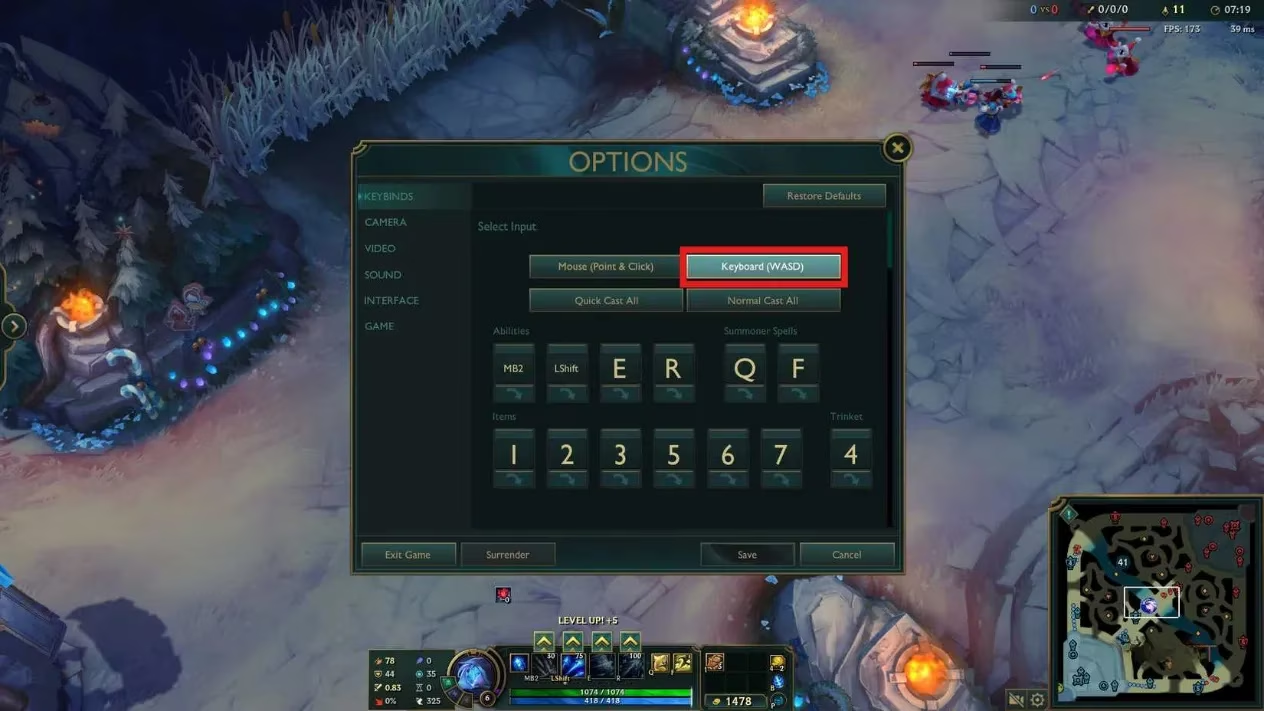
Now, the real fun begins with the new settings tailored for WASD. Under Keybinds, you can tweak the W, A, S, D keys themselves—I set mine to something quirky, like using arrow keys for nostalgia. But the star of the show is the 'Rotate WASD inputs relative to map lane orientation' option. It's like having a mini-map compass in your hands! Then there's the 'Flash Handling Type' with choices: Cursor, Movement + Cursor if Aligned, or Movement. I chose Movement for simplicity, and it felt like my champion had a mind of its own—sometimes helpful, sometimes hilariously disastrous. People also ask: How does Flash direction work with WASD? Well, it depends on your setting; if you pick 'Movement', Flash goes wherever your character is facing, which can save your skin in a tight spot or send you into a wall. 😂
Moving on, the Scout Ahead Mode is a game-changer for WASD users. Found under Hotkeys > Camera Control, it's set to the Middle Mouse Button (MB3) by default. This lets you peek around the map without moving your champ—perfect for spying on enemies or admiring the scenery. I cranked up the speed in Camera settings, and suddenly, I felt like a stealthy ninja, scouting lanes while my team fought. It adds a whole new layer of strategy, especially for warding or avoiding ganks. But beware: too much scouting and you might forget you're in a team fight—I learned that the hard way when I got ambushed while ogling the jungle. 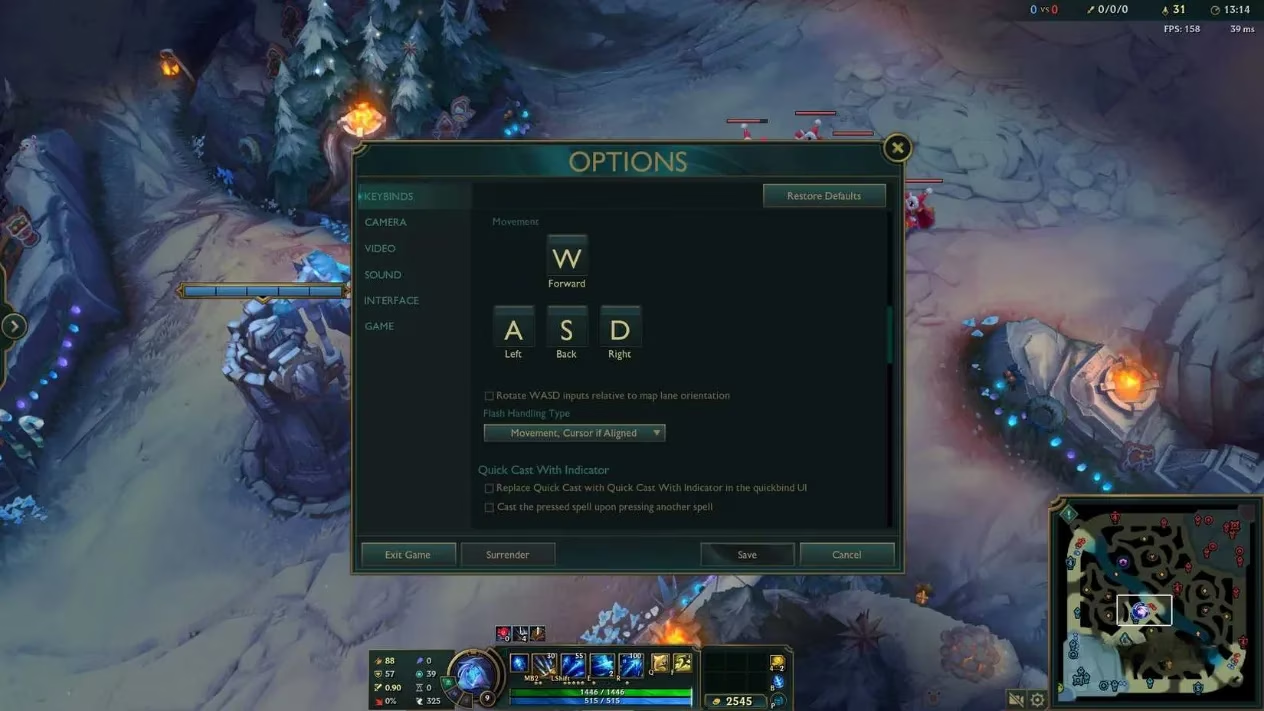
Availability is a biggie right now. As of December 2025, WASD is only live on the OCE server and in non-ranked modes like ARAM or Normals. Riot's playing it safe, rolling it out slowly to squash bugs before a global release. If OCE finds too many glitches, we might have to wait, but fingers crossed it hits all servers soon. And ranked? Nope, not yet—Riot wants it fair and bug-free first. I tried it in a casual game, and it felt like a beta test with extra chaos. People also ask: When will WASD come to ranked? Honestly, no one knows, but I bet it'll be a while as they gather feedback.
So, should you switch to WASD? As a self-proclaimed LoL veteran, I say it depends on who you are. If you're a newbie or fresh from games like Overwatch, WASD is a godsend. It feels natural, like slipping into comfy slippers, and reduces the learning curve. I saw a friend try it—he went from feeding to actually landing kills! But don't feel pressured; try both and see what clicks. For us old-timers, though, WASD might seem like an alien invasion. I've been clicking since Season 1, and switching felt like teaching my dog to drive—awkward and full of mishaps. Muscle memory is a beast to unlearn, and rebinding keys took ages. But hey, if you're curious, give it a shot; you might surprise yourself. 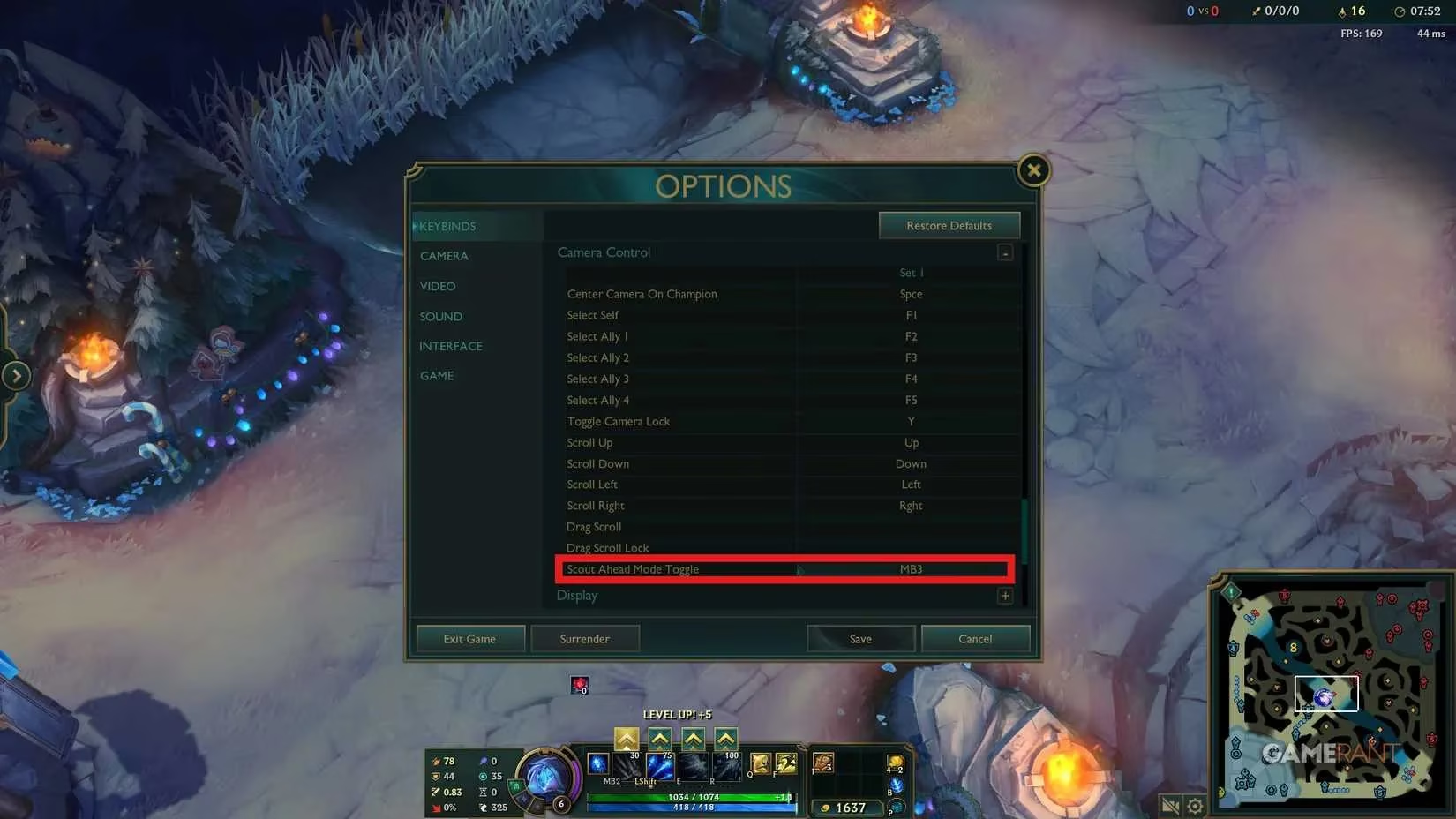
ADC mains, listen up! WASD could be your secret weapon for kiting. In my tests, it made dodging skillshots and dishing out DPS smoother, almost like dancing on hot coals. Riot nerfed it a bit during PBE testing, so it's not OP, but still viable. I practiced with Ashe, and after a few games, I was kiting like a pro—well, almost. People also ask: Is WASD better for ADC players? Potentially yes, but it requires dedication to master. Pro players might adopt it, but mouse controls are still king for now. 
In the end, WASD is a fun experiment, not a must-have. It won't replace the classic mouse feel, but it opens doors for inclusivity. I'll stick with my trusty click for ranked, but in norms? Bring on the WASD madness!
FAQ: Your Burning Questions Answered
- Q: How do I enable WASD controls in League?
A: Go to settings > Keybinds > select 'Keyboard (WASD)' in a game mode like Practice Tool, and save. Easy peasy!
- Q: Can I use WASD in ranked games?
A: Not yet! As of 2025, it's only in non-ranked modes on OCE server, with a global rollout pending.
- Q: Is WASD better for new players?
A: Absolutely! It eases the transition from other games, but try both to see what suits you.
- Q: Will WASD affect my kiting as an ADC?
A: Yes, it can help with smoother movement, but it takes practice to match mouse precision.
- Q: Can I switch back to mouse controls mid-game?
A: Only before the 10-minute mark—after that, you're locked in for the match.
- Q: Are there any new settings with WASD?
A: Yep, like Flash direction options and Scout Ahead Mode for camera control—tweak them in Keybinds!